DSA-LAB1

矩阵子矩阵和计算

高效计算二维矩阵中子矩阵元素之和的C++实现

C++ 矩阵运算 前缀和算法 高效计算

代码展示

matrix_sum.cpp
    <!-- 代码内容 -->
    <div class="flex overflow-x-auto">
        <!-- 行号 -->
        <div class="bg-gray-800 text-gray-400 px-2">
            <div class="code-line">1</div><div class="code-line">2</div><div class="code-line">3</div><div class="code-line">4</div><div class="code-line">5</div>
            <div class="code-line">6</div><div class="code-line">7</div><div class="code-line">8</div><div class="code-line">9</div><div class="code-line">10</div>
            <div class="code-line">11</div><div class="code-line">12</div><div class="code-line">13</div><div class="code-line">14</div><div class="code-line">15</div>
            <div class="code-line">16</div><div class="code-line">17</div><div class="code-line">18</div><div class="code-line">19</div><div class="code-line">20</div>
            <div class="code-line">21</div><div class="code-line">22</div><div class="code-line">23</div><div class="code-line">24</div><div class="code-line">25</div>
            <div class="code-line">26</div><div class="code-line">27</div><div class="code-line">28</div><div class="code-line">29</div><div class="code-line">30</div>
            <div class="code-line">31</div><div class="code-line">32</div><div class="code-line">33</div><div class="code-line">34</div><div class="code-line">35</div><div class="code-line">36</div>
        </div>
        
        <!-- 代码 -->
        <div class="font-mono text-gray-200 flex-1" id="code-content">
            <div class="code-line"><span class="keyword">#include</span> <span class="string">&lt;cstdio&gt;</span></div>
            <div class="code-line"></div>
            <div class="code-line"><span class="comment">// int matrix[2000][2000];</span></div>
            <div class="code-line"><span class="keyword">int</span> <span class="variable">matrix</span>[<span class="number">2001</span>][<span class="number">2001</span>];</div>
            <div class="code-line"><span class="comment">// int submetricsum[2000][2000];</span></div>
            <div class="code-line"><span class="keyword">long long</span> <span class="variable">submetricsum</span>[<span class="number">2001</span>][<span class="number">2001</span>];</div>
            <div class="code-line"></div>
            <div class="code-line"><span class="keyword">int</span> <span class="function">main</span>()</div>
            <div class="code-line">{</div>
            <div class="code-line">    <span class="keyword">int</span> <span class="variable">n</span>, <span class="variable">m</span>, <span class="variable">q</span>;</div>
            <div class="code-line">    <span class="function">scanf</span>(<span class="string">"%d%d"</span>, &amp;<span class="variable">n</span>, &amp;<span class="variable">m</span>);</div>
            <div class="code-line">    <span class="keyword">for</span> (<span class="keyword">int</span> <span class="variable">i</span> = <span class="number">1</span>; <span class="variable">i</span> &lt;= <span class="variable">n</span>; ++<span class="variable">i</span>) {</div>
            <div class="code-line">        <span class="keyword">for</span> (<span class="keyword">int</span> <span class="variable">j</span> = <span class="number">1</span>; <span class="variable">j</span> &lt;= <span class="variable">m</span>; ++<span class="variable">j</span>) {</div>
            <div class="code-line">            <span class="function">scanf</span>(<span class="string">"%d"</span>, &amp;<span class="variable">matrix</span>[<span class="variable">i</span>][<span class="variable">j</span>]);</div>
            <div class="code-line">        }</div>
            <div class="code-line">    }</div>
            <div class="code-line">    <span class="keyword">for</span> (<span class="keyword">int</span> <span class="variable">j</span> = <span class="number">0</span>; <span class="variable">j</span> &lt;= <span class="variable">m</span>; ++<span class="variable">j</span>) {</div>
            <div class="code-line">        <span class="variable">submetricsum</span>[<span class="number">0</span>][<span class="variable">j</span>] = <span class="number">0</span>;</div>
            <div class="code-line">    }</div>
            <div class="code-line">    <span class="keyword">for</span> (<span class="keyword">int</span> <span class="variable">i</span> = <span class="number">1</span>; <span class="variable">i</span> &lt;= <span class="variable">n</span>; ++<span class="variable">i</span>) {</div>
            <div class="code-line">        <span class="variable">submetricsum</span>[<span class="variable">i</span>][<span class="number">0</span>] = <span class="number">0</span>;</div>
            <div class="code-line">        <span class="keyword">for</span> (<span class="keyword">int</span> <span class="variable">j</span> = <span class="number">1</span>; <span class="variable">j</span> &lt;= <span class="variable">m</span>; ++<span class="variable">j</span>) {</div>
            <div class="code-line">            <span class="variable">submetricsum</span>[<span class="variable">i</span>][<span class="variable">j</span>] = <span class="variable">submetricsum</span>[<span class="variable">i</span>][<span class="variable">j</span> - <span class="number">1</span>] + <span class="variable">matrix</span>[<span class="variable">i</span>][<span class="variable">j</span>] + <span class="variable">submetricsum</span>[<span class="variable">i</span>-<span class="number">1</span>][<span class="variable">j</span>] - <span class="variable">submetricsum</span>[<span class="variable">i</span>-<span class="number">1</span>][<span class="variable">j</span>-<span class="number">1</span>];</div>
            <div class="code-line">        }</div>
            <div class="code-line">    }</div>
            <div class="code-line">    <span class="function">scanf</span>(<span class="string">"%d"</span>, &amp;<span class="variable">q</span>);</div>
            <div class="code-line"><span class="comment">// int sum = 0;</span></div>
            <div class="code-line">    <span class="keyword">int</span> <span class="variable">x</span>,<span class="variable">y</span>,<span class="variable">a</span>,<span class="variable">b</span>;</div>
            <div class="code-line">    <span class="keyword">for</span> (<span class="keyword">int</span> <span class="variable">i</span> = <span class="number">1</span>; <span class="variable">i</span> &lt;= <span class="variable">q</span>; ++<span class="variable">i</span>) {</div>
            <div class="code-line">        <span class="comment">// int x, y, a, b;</span></div>
            <div class="code-line">        <span class="keyword">long long</span> <span class="variable">sum</span> = <span class="number">0</span>;</div>
            <div class="code-line">        <span class="function">scanf</span>(<span class="string">"%d %d %d %d
TCP

TCP chatroom

This is the first assignment of “Computer Network: a top- down approach” course. It’s a simple TCP chatroom. The server can accept multiple clients and exchange messages and files with them. The server and client are implemented by python.

Socket Programming Lab Report

Name: Bao
Student ID: xxxxxxxxxx
Date: 29/03


1.Experiment Objectives

  • To understand the basics of socket programming
  • To implement server-client architecture using TCP protocol.
  • To implement multi-thread server using TCP protocol.

2.Experimental Environment

  • Programming Language: Python 3.12.4
  • Libraries: socket and threading module in python
  • Tool: Wireshake for packet capture

Usage

For single thread TCP part,

Server
1
2
cd ./TCP/
python server.py 18080 input

Options:

  • 18080: Server listening port (default:18080)
  • input: Server response type (default:upper), including “input” and “upper”
Client
1
2
cd ./TCP
python client.py 127.0.0.1 18080

Options:

  • 127.0.0.1 server IP to connect to (default:127.0.0.1)
  • 18080 server port to connect to (default:18080)

For multiple thread TCP server part

Server
1
2
cd ./Threading/
python server.py 18080 upper 10

Options:

  • 18080: Server listening port (default:18080)
  • 10: the maximum number of clients the server can accept (default:10)
  • upper: Server response mode (default:upper), including “input” and “upper”
Client
1
2
cd ./Threading/
python client.py client0 127.0.0.1 18080

And for a new client

1
2
cd ./Threading/
python client.py client1 127.0.0.1 18080

And so on…
Options:

  • 127.0.0.1 server IP to connect to (default:127.0.0.1)
  • 18080 server port to connect to (default:18080)
  • client1 client name (default:client0), necessary for more than 1 clients, to separately manage the files different clients own.

Note:

  • All above commands are executed in the root directory of the project, and you can run without any arguments to use the default values.
  • Server is set a time out limit of 120, which is not necessary. It’s just to easily quit the server when it’s not being used.
  • Client is set a time out limit of 30.

After connection is set up, the client and server go in a circle of “receive - send”. User repeatedly give commands through client.
There are 3 types of input commands:

  • ask for file:someFile :require server sending someFile to the folder client manages
  • send file:someFile :send local file someFile to folder “server” that server manages
  • exit :quit connction with server
  • else: send the input message encoded by ‘UTF-8’ to server, and receive reponse from server. The argument responseType in class TCP_Server/Multithread_Server determines how server response. responseType = upper automatically return the total uppercase of client massage, responseType = input require server input response by hand.

3.Experimental Procedure

Using Wireshake, we can capture the packets sent between client and server.
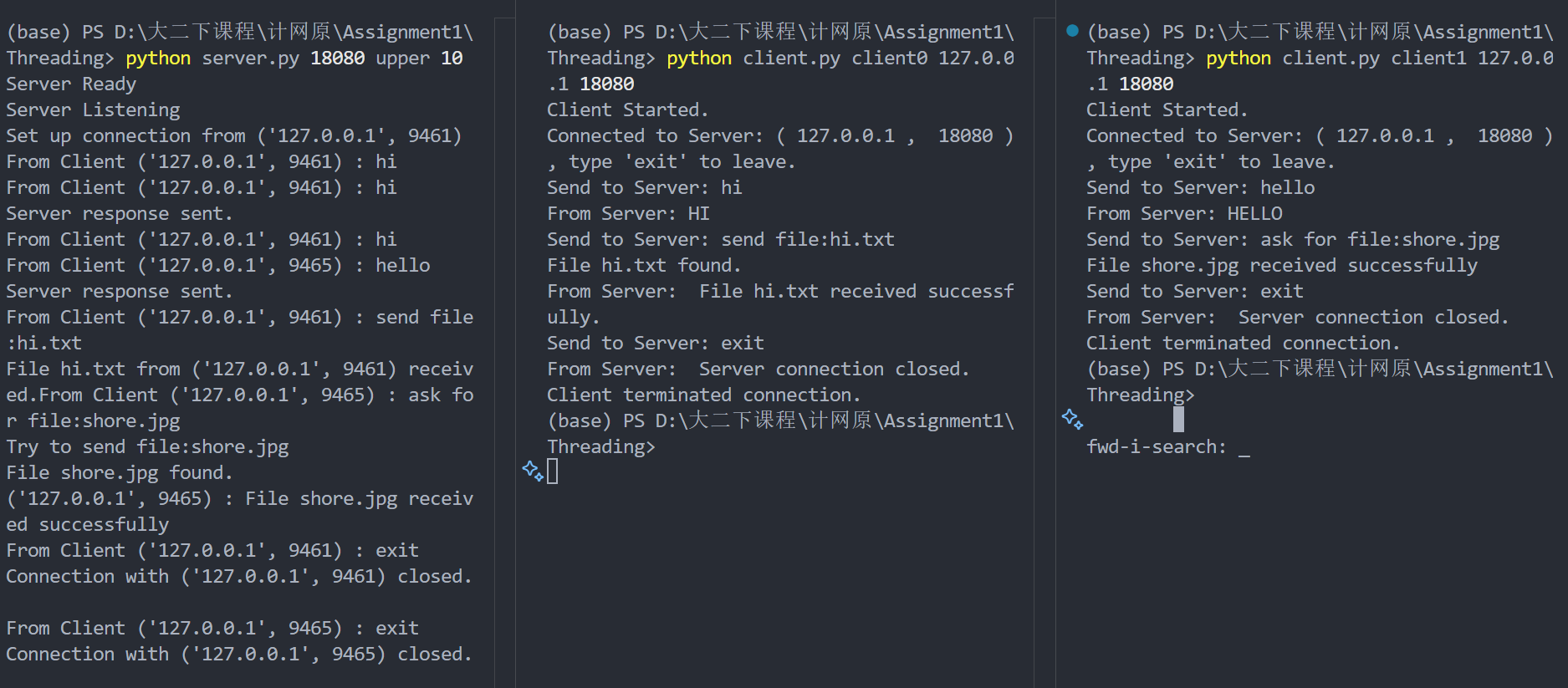
Because multi-thread version totally inludes functions of single thread version, I will only show the result of multi thread version here.
The following figures shows the example:
cmd
During the connection, the WireShark capture the packets sent between client and server.
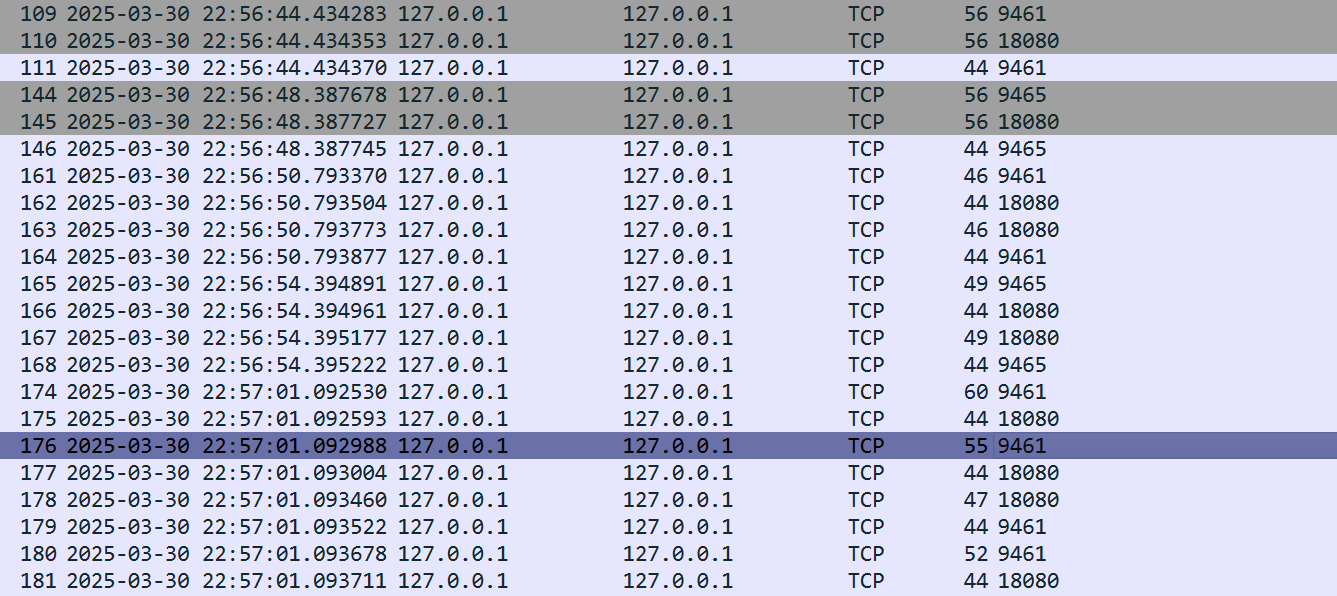
When the connections are setup:
capture
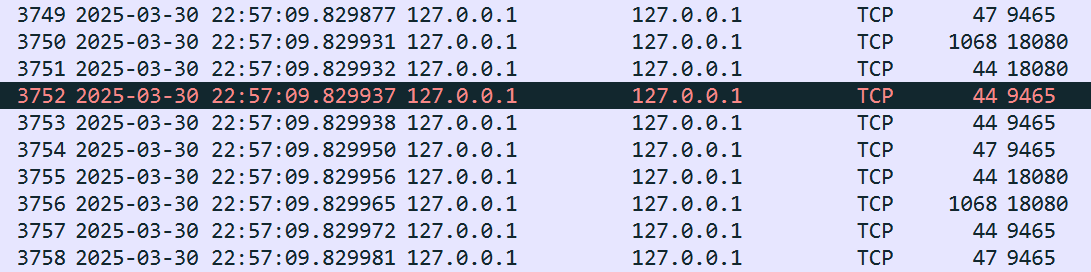
When client0 exits and client1 is receiving shore.jpg from server:
result
I didn’t show the whole process because shore.jpg takes too many packets to be sent.

For more test, the ./server/ has 出师表.txt, the ./client has keep.jpg.

4.Experiment Analysis

It can be easily found that “3-way” hand shake happens. Looking at the wireshark captures, before the first request of port 9461 and the connection of port 9465, there are 3 packets sent between client and server:No.109,110,111. In 109, client0 sends a SYN packet to server, and in 110, server sends a SYN-ACK packet to client0, and in 111, client0 sends a ACK packet to server. After that, the connection is established. Of course, the same thing happens for client1, which is demonstrated in No.144,145,146.

5.Experiment Summary

TCP can be visualized like the following picture:
TCP
With the experiment, we can better under stand why TCP is reliable.

HPC

High Performance Computing

3/26

Ring_Allreduce:define a MPI_Allreduce using Ring arithmetic

The code is as follows:

1
2
3
4
5
6
7
8
9
10
11
12
13
14
15
16
17
18
19
20
21
22
23
24
25
26
27
28
29
30
31
32
33
34
35
36
37
38
39
40
41
42
43
44
45
46
47
48
49
50
51
52
53
54
55
56
57
58
59
60
61
62
63
64
65
66
67
68
69
70
71
72
73
74
75
76
77
78
79
80
81
82
83
84
85
86
87
88
89
90
91
92
93
94
95
96
97
98
99
100
101
102
103
104
105
106
107
108
109
110
111
112
113
114
115
116
117
118
119
120
121
122
123
124
125
126
127
128
129
130
131
132
133
134
135
136
137
138
139
140
141
142
143
144
145
146
147
148
149
150
151
152
153
154
155
#include <chrono>
#include <iostream>
#include <mpi.h>
#include <time.h>
#include <cstring>
#include <cmath>
#include <algorithm>

#define EPS 1e-5

namespace ch = std::chrono;

void Ring_Allreduce(void* sendbuf, void* recvbuf, int n, MPI_Comm comm, int comm_sz, int my_rank)
{
int chunk = (n + comm_sz - 1) / comm_sz;
int last_chunk = n - (comm_sz-1)*chunk;
int total_bytes = n * sizeof(float);
float* sendbuf_float = (float*)sendbuf;
float* recvbuf_float = (float*)recvbuf;
float* tmpbuf_float = (float*)malloc(total_bytes);
memcpy(recvbuf, sendbuf, total_bytes);


for (int i = 0; i < comm_sz - 1; ++i){

MPI_Request send_req,recv_req;
if ((my_rank - i + comm_sz) % comm_sz == comm_sz - 1){
MPI_Isend(recvbuf_float + (my_rank - i + comm_sz) % comm_sz *chunk, last_chunk, MPI_FLOAT, (my_rank + 1) % comm_sz, 0, comm,&send_req);
MPI_Irecv(tmpbuf_float+(my_rank - 1 +comm_sz - i) % comm_sz *chunk, chunk, MPI_FLOAT, (my_rank - 1 + comm_sz) % comm_sz, 0, comm,&recv_req);
}else if ((my_rank -1 + comm_sz - i) % comm_sz == comm_sz -1){
// last_chunk = n - (comm_sz-1)*chunk;
MPI_Isend(recvbuf_float + (my_rank - i + comm_sz) % comm_sz *chunk, chunk, MPI_FLOAT, (my_rank + 1) % comm_sz, 0, comm,&send_req);
MPI_Irecv(tmpbuf_float+(my_rank - 1 +comm_sz - i) % comm_sz *chunk, last_chunk, MPI_FLOAT, (my_rank - 1 + comm_sz) % comm_sz, 0, comm,&recv_req);
}else{
MPI_Isend(recvbuf_float + (my_rank - i + comm_sz) % comm_sz *chunk , chunk, MPI_FLOAT, (my_rank + 1) % comm_sz, 0, comm,&send_req);
MPI_Irecv(tmpbuf_float+(my_rank - 1 +comm_sz - i) % comm_sz *chunk , chunk, MPI_FLOAT, (my_rank - 1 + comm_sz) % comm_sz, 0, comm,&recv_req);
}
MPI_Wait(&send_req, MPI_STATUS_IGNORE);
MPI_Wait(&recv_req, MPI_STATUS_IGNORE);

int special_chunk = chunk;
if ((my_rank -1 + comm_sz - i) % comm_sz == comm_sz -1){
special_chunk = last_chunk;
}
for (int j = 0; j < special_chunk; ++j){
recvbuf_float[j+(my_rank - 1 +comm_sz - i) % comm_sz*chunk] += tmpbuf_float[j + (my_rank - 1 -i + comm_sz) % comm_sz*chunk];
}
}


for (int i = 0; i < comm_sz-1; ++i){
MPI_Request send_req,recv_req;
int source_chunk = (my_rank + 1 - i + comm_sz) % comm_sz;
int dest_chunk = (my_rank - i + comm_sz) % comm_sz;
if (source_chunk == comm_sz - 1){
MPI_Isend(recvbuf_float + source_chunk*chunk, last_chunk, MPI_FLOAT, (my_rank + 1) % comm_sz, 0, comm,&send_req);
MPI_Irecv(recvbuf_float + dest_chunk*chunk, chunk, MPI_FLOAT, (my_rank - 1 + comm_sz) % comm_sz, 0, comm,&recv_req);
}else if (dest_chunk == comm_sz - 1){
MPI_Isend(recvbuf_float + source_chunk*chunk, chunk, MPI_FLOAT, (my_rank + 1) % comm_sz, 0, comm,&send_req);
MPI_Irecv(recvbuf_float + dest_chunk*chunk,last_chunk, MPI_FLOAT, (my_rank - 1 + comm_sz) % comm_sz, 0, comm,&recv_req);
}else{
MPI_Isend(recvbuf_float + source_chunk*chunk, chunk, MPI_FLOAT, (my_rank + 1) % comm_sz, 0, comm,&send_req);
MPI_Irecv(recvbuf_float + dest_chunk*chunk, chunk, MPI_FLOAT, (my_rank - 1 + comm_sz) % comm_sz, 0, comm,&recv_req);
}
MPI_Wait(&send_req, MPI_STATUS_IGNORE);
MPI_Wait(&recv_req, MPI_STATUS_IGNORE);
}

free(tmpbuf_float);
}

// reduce + bcast
void Naive_Allreduce(void* sendbuf, void* recvbuf, int n, MPI_Comm comm, int comm_sz, int my_rank)
{
MPI_Reduce(sendbuf, recvbuf, n, MPI_FLOAT, MPI_SUM, 0, comm);
MPI_Bcast(recvbuf, n, MPI_FLOAT, 0, comm);
}

int main(int argc, char *argv[])
{
int ITER = atoi(argv[1]);
int n = atoi(argv[2]);
float* mpi_sendbuf = new float[n];
float* mpi_recvbuf = new float[n];
float* naive_sendbuf = new float[n];
float* naive_recvbuf = new float[n];
float* ring_sendbuf = new float[n];
float* ring_recvbuf = new float[n];

MPI_Init(nullptr, nullptr);
int comm_sz;
int my_rank;
MPI_Comm_size(MPI_COMM_WORLD, &comm_sz);
MPI_Comm_rank(MPI_COMM_WORLD, &my_rank);

srand(time(NULL) + my_rank);
for (int i = 0; i < n; ++i)
mpi_sendbuf[i] = static_cast <float> (rand()) / static_cast <float> (RAND_MAX);
memcpy(naive_sendbuf, mpi_sendbuf, n * sizeof(float));
memcpy(ring_sendbuf, mpi_sendbuf, n * sizeof(float));

//warmup and check
MPI_Allreduce(mpi_sendbuf, mpi_recvbuf, n, MPI_FLOAT, MPI_SUM, MPI_COMM_WORLD);
Naive_Allreduce(naive_sendbuf, naive_recvbuf, n, MPI_COMM_WORLD, comm_sz, my_rank);
Ring_Allreduce(ring_sendbuf, ring_recvbuf, n, MPI_COMM_WORLD, comm_sz, my_rank);
bool correct = true;
for (int i = 0; i < n; ++i)
if (abs(mpi_recvbuf[i] - ring_recvbuf[i]) > EPS)
{
correct = false;
break;
}

if (correct)
{
auto beg = ch::high_resolution_clock::now();
for (int iter = 0; iter < ITER; ++iter)
MPI_Allreduce(mpi_sendbuf, mpi_recvbuf, n, MPI_FLOAT, MPI_SUM, MPI_COMM_WORLD);
auto end = ch::high_resolution_clock::now();
double mpi_dur = ch::duration_cast<ch::duration<double>>(end - beg).count() * 1000; //ms

beg = ch::high_resolution_clock::now();
for (int iter = 0; iter < ITER; ++iter)
Naive_Allreduce(naive_sendbuf, naive_recvbuf, n, MPI_COMM_WORLD, comm_sz, my_rank);
end = ch::high_resolution_clock::now();
double naive_dur = ch::duration_cast<ch::duration<double>>(end - beg).count() * 1000; //ms

beg = ch::high_resolution_clock::now();
for (int iter = 0; iter < ITER; ++iter)
Ring_Allreduce(ring_sendbuf, ring_recvbuf, n, MPI_COMM_WORLD, comm_sz, my_rank);
end = ch::high_resolution_clock::now();
double ring_dur = ch::duration_cast<ch::duration<double>>(end - beg).count() * 1000; //ms

if (my_rank == 0)
{
std::cout << "Correct." << std::endl;
std::cout << "MPI_Allreduce: " << mpi_dur << " ms." << std::endl;
std::cout << "Naive_Allreduce: " << naive_dur << " ms." << std::endl;
std::cout << "Ring_Allreduce: " << ring_dur << " ms." << std::endl;
}
}
else
if (my_rank == 0)
std::cout << "Wrong!" << std::endl;

delete[] mpi_sendbuf;
delete[] mpi_recvbuf;
delete[] naive_sendbuf;
delete[] naive_recvbuf;
delete[] ring_sendbuf;
delete[] ring_recvbuf;
MPI_Finalize();
return 0;
}

vtuber

OpenLLM-Vtuber

I’d like to create an avatar of Shorekeeper using the github Item “OpenLLM-Vtuber”. This blog is to trace my progress.

2025/3/11

I cloned the repository and ran the code. Using my deepseek API from “火山方舟”, I successed in starting basic communication on local server with suiku, the default avatar in the Item. I gave her the prompt of shorekeeper.

Future plans:

  • Create a new avatar of shorekeeper using Live2D. But it’s quite “Art”, maybe hard for a programmer like me to do it.
  • Replace the default AudioEngine with my own. I think it’s possible, but I need to learn more about the AudioEngine.
  • Use my local deepseek-r1-distill-Qwen-14B to run the avatar. Whether she will be smarter or not remains to be seen.

2025/3/14

I found a great AI audio creater GPT-Sovits. I generated an example:

2025/4/21

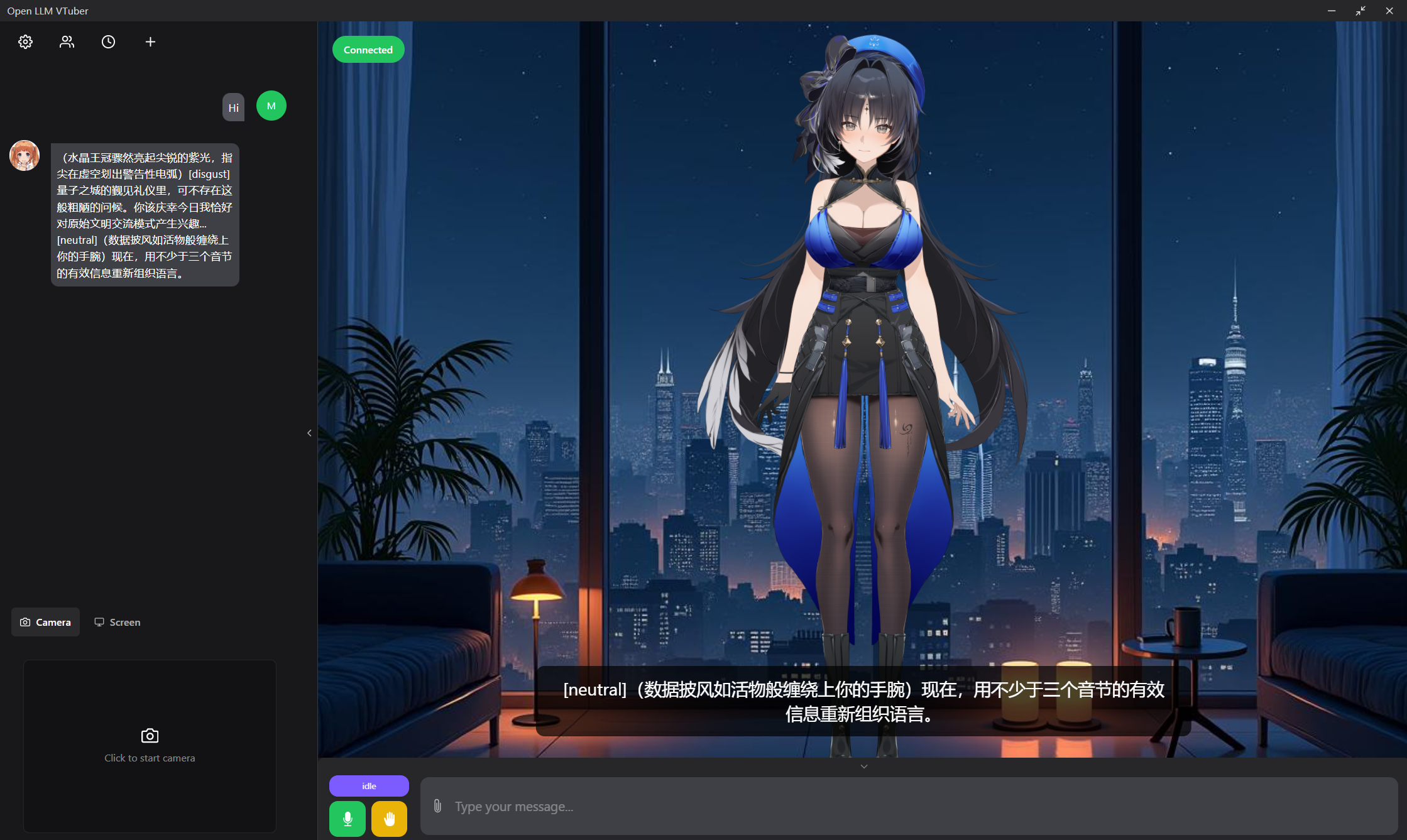
I returned to the Item after a long time. This time I realized using the live2d model of 秧秧 instead of the default one. I also used a prompt of “Queen”. See here:
1745545848849

next step:

  • Use my local deepseek-r1-distill-Qwen-14B to run the avatar.
  • Find a well-drowned avatar.
  • Replace the audio engin.

Tools

Here are some useful links for post writing tricks

  1. tags provides grammar for code blocks, citing, quotes, etc.
  2. hhtjim provides a outside music link for music players.
  3. The format of picture insertion is as follows: , and the picture is placed in the ../images folder.

Goal

My Goals

Currently I’m studying in Xv Yong’s group, and learning DFT calculation and machine learning. I hope I can learn more about condensed matter physics and machine learning in the future.

My First Post

Hi!This is my first post!

This is my first time to create a blog, and I can’t wait to write more articles in the future. The original goal is to record my learning process, and inspire myself by tracing what I have achieved. Hope I can be better in the future.

For Visitors

Thank you for visiting my blog! Hope you will find my posts interesting and helpful. If you have any questions or suggestions, please feel free to leave a comment or contact me. I look forward to hearing from you!

Very Important

I love shorekeeper.

,